2/17/2024
Linda said a few weeks ago that since there’s not much going on in the apiary, I could write about some of my other interests. Well, I thought it and decided that it would be a great way to not get out of the habit of writing. I did something similar when I was finishing up my Doctoral program. The idea was to write something everyday, even if you discard it later. So, here we go.
I got into 3D printing in the summer of 2021 just a few weeks before I contracted COVID 19 and ultimately ended up in the hospital for much of July. At the time I was working on a Home Assistant project ended needed the container for the project printed. I had the file, but no printer. After looking for someone to print it for me, I bought a Anycubic Mega S shown below.

The truth is, I had no idea what I was doing and/or buying. I looked for a low price point, not realizing low price meant the printer would have limited capabilities and upgradability. This I found out later.
So, what is 3D printing?
For our purposes, 3D printing is essentially melting a thin cord of plastic – called filament – and applying it to a heated surface – the bed – to create a design. In a sense, it’s like a CNC router that cuts wood into a design. A big difference is that a 3D printer starts from the bottom and works up while a CNC router starts at the top of a block and works down.
A 3D printer consists of a frame, a control board, a screen to control the device, stepper motors, an extruder, a bed to print on, and a hotend. The frame is simply the infrastructure that holds all the components in place.
Control boards are very similar to the motherboards found in computers, laptops, etc. The control boards I’m most familiar with are made by Makerbase. The one I currently used are pictured below:


Both of these boards are stable with a lot of features (more than I can use)
The stepper motors are small motors that move to the correct X, Y, and Z position based on what is being printed. They are stepper motors because the input to the motors is a small change of voltage that causes the motor to turn. The most common one is shown below.

The screens come in a shapes and sizes, so there isn’t a typical one to showcase. They are typically control by touch. They sort of look like the screen of your phone.
The extruder consists of a series of gears, driven by a stepper motor, that pushes the filament into the hotend. My favorite for a printer upgrade is shown below. They are incredibly light and you can print as fast or slow as you want or need.

The hotend is what both melts the filament and and determines how thick the output will be based on the size of the nozzle. My favorite one for a printer upgrade is shown below. It is designed for both high temperature and high speed printing.

The bed is simply what the melted plastic is placed on. They can be glass, copper, and other types of material. I have tried many types and don’t have a real favorite.
Back to the story…
I hope the explanations above weren’t too much. You need to have a basic introduction of the parts and pieces to understand what happened next.
Sometime in September of 2021, Linda thought I would enjoy getting back into my home office and start doing stuff (you know the generic stuff). When I first looked at the printer, I couldn’t remember anything about it – nothing. After a couple of days, I relearned enough to give printing a go.
The printer performed well. Made lots of stuff. And this is when the story changes.
In the middle of December, I was making Christmas presents. Most were made, but I still wanted to make a few more. Then without warning the printer stops working. I tried a few things, but nothing helped. Then I remembered it had a one year warranty. Great, but how do I contact tech support?
Anycubic is located in China and at the time had no clear method of contacting support. After a couple a days, I found the email link to the support center. I sent them a message. It took a week to get a response. I stated a wanted a new printer. The response was no. They said we’ll send you a new power supply.
I finally accepted that was all they would do for me. So i waited about 6 weeks for the power supply to arrive. I installed it, but the printer would not start up. So a rinse and repeat process of contacting tech support.
This time they sent a replacement control board. I installed it and a new problem appeared. The printer started up, but there was an error message on the screen that said (after learning the error codes) that the temperature of the hotend was not being monitored. So once again a no go.
Then round three of tech support. More parts. No resolution. It was the same for rounds four, five and six. Then the printer was out of the warranty period and no further support was given. So the lesson to be learned is to have an understanding of what tech support will and won’t do. Buyer beware!
Enter Fokoos
Sometime early in 2022, I started looking for a replacement printer. I found a young startup company that was heavily advertised on Amazon. I found several other sources that gave the company a good review. They had a very active Facebook page that said joining the group would extend the warranty a year. So it would be a two year warranty. So I bought the next printer shown below.

This machine was a beast. It printed well out of the box. It was faster and I was – an still an – satisfied with the product.
Then after several months it quit working. At the time, they company had a tech support person who answered questions about the printer in the Facebook group and also arranged for part replacement. I sent the person a message and in two weeks a power supply arrived. In the 3D printing world, this was good service.
And then it gets weird. This time they said they would send me a Amazon returned printer that I could do with what I wanted. It was FedEx delivered in a couple of days.
I unboxed it and discovered it was in better shape that my original one. Had it up and printing in less than an hour.
But the first printer sat there not working. In early 2023, I begin to see what it would take to get it to work. I discovered that the control board was indeed bad. I ordered the MKS Robin Nano V1.2 featured above. After learning a little bit about firmware, I had two working. It was great. Multiple prints at the same same time, much more efficient.
In the middle of 2023, I started to realize that Fokoos as a company was starting to struggle. Having been their myself earlier in my life, I sympathized with them. But this also meant that I needed contingencies. On their website, they advertised a returned printer for $79.00. I bought one with the thought of junking it out for parts.
When it arrived, my Grandson was at the house. He begged me to open it up. After a while I agreed and we unboxed it. Once again we found it in better shape than the two we had running. So, then, there were three.
In late 2023, it was apparent the company was out of the printer business. I don’t really mind because when you bet on a startup company the odds of them being open for any length of time is pretty small.
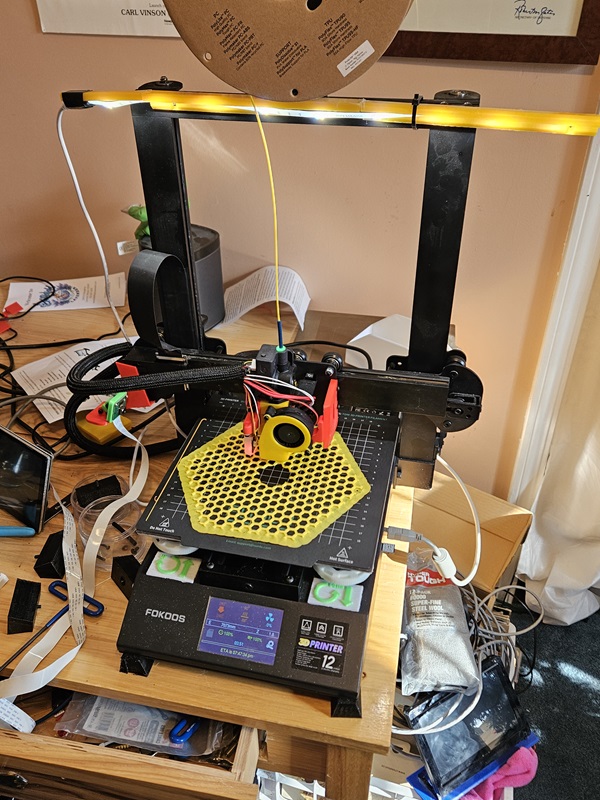
I started looking for ways to upgrade the printers when the goal of eliminating any proprietary parts. The result is shown below.

I completely redid the hotend and directly wired the various components to the control board. I used the Phaetus Dragon and the Orbiter 2 featured above. The machine is now fast, quiet, and is capable of using any type of filament. It was a great upgrade.
How are they used?
I use the printer to make seasonal displays, presents, and various parts. In addition, I use them to print the signs for the all the flower beds – that alone keeps them working hard. As I’m typing this up, I’m printing the tray for a bee feeder. A quick video is below.
I know this is a long post, but I’ve enjoyed creating it and I hope you appreciate it.
I forgot to mention that the Anycubic printer is being rebuilt. Soon there will be four.
Last modified:
Leave a Reply